Source: https://mindstamp.com/help/how-to-embed-in-video-features-using-html-text
Generated from the Help Center records: 2026-10-05
# How can I use HTML in a Mindstamp video?
Topic: [Design, branding and languages](https://mindstamp.com/help/design) · Updated: 2026-09-25
## Short answer
Open a text interaction, go to the **Content** tab, and select **Edit as HTML**. You can use HTML for line breaks, alignment, size, color, lists, links, images and icons, and an `iframe` to embed a form, map or scheduler. Mindstamp removes scripts and other tags that are not on its allowed list.
## Steps
1. Add a **Text** interaction, or select one on the timeline.
2. On the **Content** tab, select **Edit as HTML**.
3. Type or paste your HTML. Use **Insert Icon** to add an icon.
4. Check the preview next to the editor, then save.
5. Resize the interaction on the video so the content fits.
6. Test: play the video in **Preview** on a laptop and a phone. Expected result: the formatting shows, and an embedded form or page loads and responds inside the interaction.

_Choose an image from your library, a URL or stock images, or upload a new one, then select Use image._
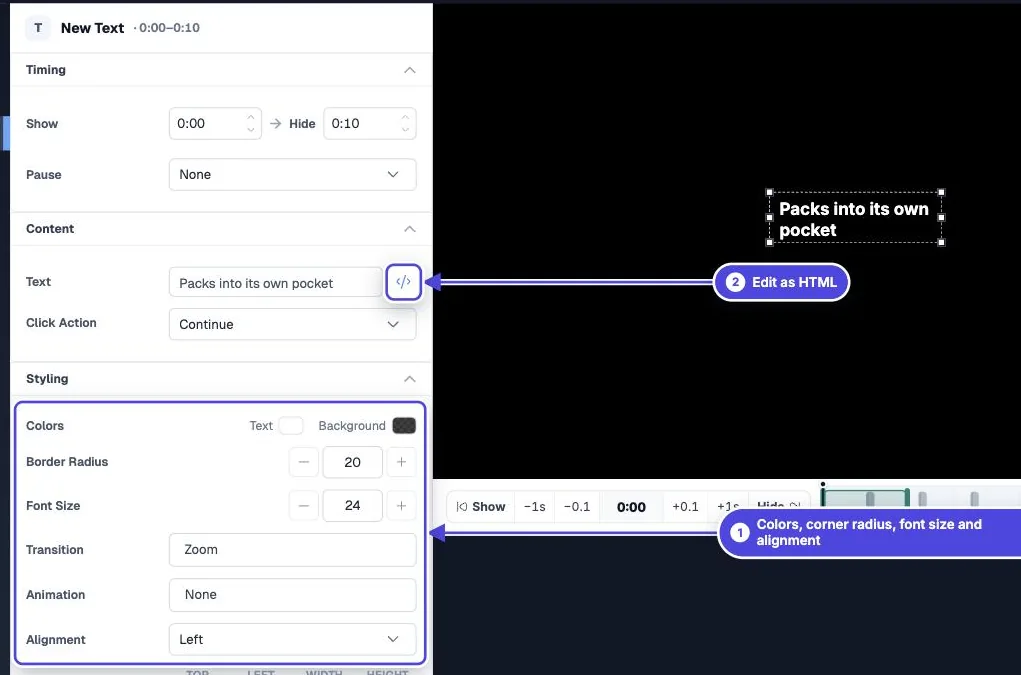
_A text interaction: edit its content as HTML, and set its colors, corner radius, font size and alignment under Styling._
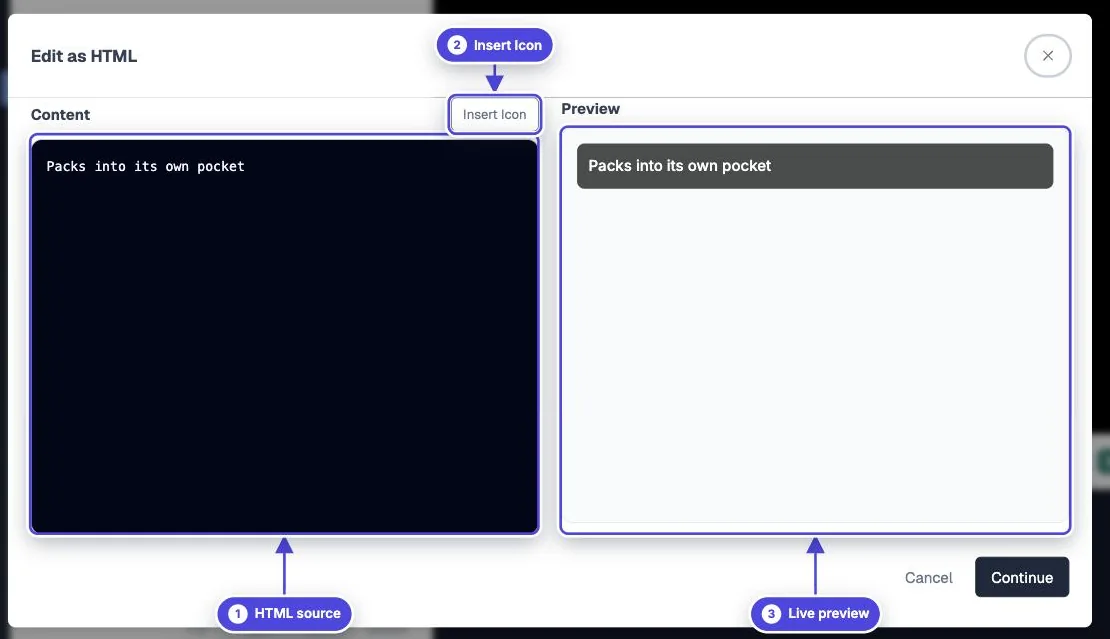
_Edit as HTML: write the HTML on the left, insert an icon, and check the live preview on the right._
## Where HTML works
The full HTML editor is on text interactions. Button labels, question prompts, the Lead Capture prompt and **Show message** messages also show simple HTML that you type into their text fields.
## Allowed tags and attributes
In text, button, comment and message content, Mindstamp keeps these tags: `div`, `p`, `span`, `br`, `h1`, `h2`, `strong`, `b`, `em`, `i`, `ul`, `li`, `a`, `img`, `iframe` and `style`. It keeps these attributes: `src`, `href`, `width`, `height`, `frameborder`, `allow`, `allowfullscreen`, `style` and `class`.
Everything else is removed when the video plays, including `script`, forms, `ol`, `h3`, `target` and event attributes such as `onclick`. Inline styles that use `position: fixed`, `z-index`, `100vw` or `100vh` are also removed, so content cannot cover the whole page.
## Format text
```
Welcome
This paragraph aligns to the left.
- Step 1: Watch the demo
- Step 2: Answer the question
```
## Embed a form, map or scheduler
Paste the embed code the other tool gives you, as long as it is an `iframe`. The other site must allow its page to load in a frame. Some sites block this, and then the frame stays blank.
Embed codes that need a `script` tag do not work, because scripts are removed. Ask the tool for its iframe version, or open the page with the **Open Link Modal** click action instead.
```
```
## Keep custom HTML maintainable
- Use the Design and Styling controls first. HTML styles do not change when you update your Design colors later.
- Use a few repeatable patterns, not a new style in every interaction.
- Test on a phone. Fixed pixel sizes can overflow a small player.
- Keep links and important text readable without the styling.
## Go further
- [HTML embeds](https://mindstamp.com/features/embed-html)
- [Interactions tutorial](https://mindstamp.com/tutorials/interactions)
## Related answers
- [How do I change the text alignment and design of interactions and overlays?](https://mindstamp.com/help/interaction-text-and-overlay-styling)
- [How do I change the color and design of text interactions?](https://mindstamp.com/help/how-do-i-change-the-color-or-design-of-text-comments-on-mindstamp)
- [How do I embed a booking calendar in my video?](https://mindstamp.com/help/how-to-embed-calendars-natively-into-your-interactive-videos)
- [What click actions are available in Mindstamp?](https://mindstamp.com/help/click-actions)
---
Need more help? [Contact Mindstamp](https://mindstamp.com/contact) · [Help Center](https://mindstamp.com/help) · [All Help Center articles as JSON](https://mindstamp.com/help-feed/index.json)