Why can’t I download my Mindstamp video?
Short answer
A Mindstamp video is an interactive experience that runs in the Mindstamp player, so you cannot download it as one video file or play it in another player such as YouTube or Vimeo. You can download the original source file from More > Download source, and you can download an offline package from the Share page to run the experience without internet.
How to do it
Copy link to How to do it- To get the original file, open the video, go to More and select Download source.
- To run the interactive video without internet, go to Share and select Download offline package. Offline packages are on Core and higher plans.
- Select Create offline package and wait for the build to finish.
- Select Download ZIP, extract the full ZIP, and open START EXPERIENCE.html in Chrome or Edge.

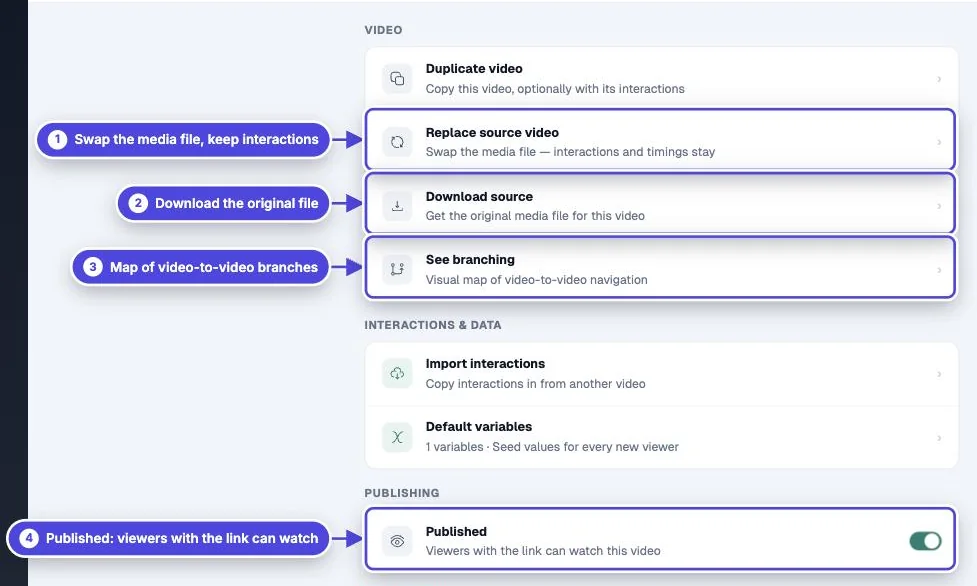
Why the interactive version is not a video file
Copy link to Why the interactive version is not a video fileQuestions, branching, personalization and reports depend on the Mindstamp player. A flat video file cannot ask a question, change path from a viewer’s answer, or record a response. This is true of interactive video in general, not only Mindstamp.
Download the original file
Copy link to Download the original fileDownload source gives you the original media file for the video, with no interactions. It is available for uploaded videos and MP4 links. For other sources, such as Vimeo, Wistia or an HLS link, download the file from that host.
Run it without internet
Copy link to Run it without internetAn offline package is a ZIP that runs the experience in Chrome or Edge on a Windows or Mac computer, for example at a trade show. It is a snapshot: rebuild it after you change the video. Offline views and answers do not appear in your reports. See offline mode.
Use it on other platforms
Copy link to Use it on other platforms- Share the link or embed the player on your website. See how to embed a video.
- Add it to an LMS with a SCORM package. The package loads the hosted player, so it still needs internet. See SCORM export.
- If you upload the plain video file to YouTube or social media, viewers see a normal video without interactions. Share the Mindstamp link instead. See how to share.