
Automatic marking
The score is computed as the viewer answers, so nobody reads through responses to grade them.
Ask a question
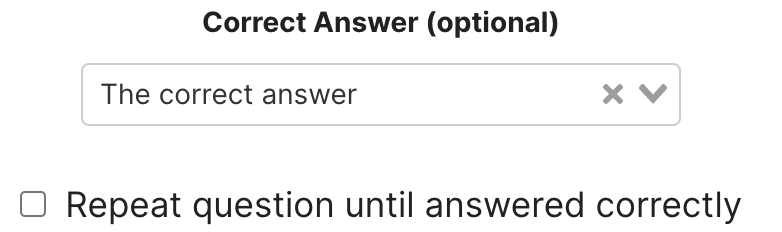
Set the correct response on any question so Mindstamp scores it automatically and reports who passed.
What it does
A question is only an assessment once something decides whether the answer was right.
The score is computed as the viewer answers, so nobody reads through responses to grade them.
Show the viewer whether they were right while the material is still on screen.
Each attempt is stored, so first-attempt pass rate is a number you actually have.
In practice
Anywhere the outcome has to be defensible rather than impressionistic.
In depth
One of the most common interaction types added through Mindstamp are questions. There are various different question types that Mindstamp offers and one of the benefits of asking questions is the ability to track correctness.
Once you have created a question in your video you can set the correct answer to your question. This gives you the ability to get a correctness score for every view on your videos. Correctness works for free response, multiple choice, and dropdown select question types. You can even have the question repeated until the viewer has answered correctly allowing them multiple attempts for the same question.
Correctness provides you with the ability to “quiz” your audience providing a dynamic and interactive learning experience. By setting up questions with correct answers throughout your interactive video, you can create quiz-like videos that provide your audience with an engaging and fun way to learn the material. You can use correctness to track performance of your viewers or you can use correctness to ensure material is understood.
By forcing the question to be repeated until answered correctly, you can guarantee your audience understands your material before continuing in your video. Once a viewer has completed your video, you can see their results on your Mindstamp dashboard showing their participation and correctness. These results can even be synced with your CRM or LMS for lead generation, student tracking, and countless other use cases.
When watching a video for a particular product or service, most people aren’t going to remember what they watched unless something exciting or interesting stands out to them. By using questions with correct answers attached you can engage with your audience in a way that encourages them to remember the key points of your product or service.
When they answer a question and see that they answered it correctly (or even incorrectly) that question will stand out to them creating an opportunity for your potential customers to remember your product.
What gets measured
Related
These combine on one timeline — most videos use three or four together.
Let viewers select every option that applies, and score the whole set rather than a single pick.
Explore →Collect a real date from the viewer inside the video, in a format that stays usable downstream.
Explore →Ask viewers to circle, mark, or annotate directly on the frame, and keep the drawing as their submitted answer.
Explore →Give viewers a dropdown when there are too many options to show as buttons, and keep the frame clean.
Explore →Ask an open question inside the video and collect typed answers against each viewer, no form page required.
Explore →Run proper Likert items inside the video so attitude and confidence surveys sit where the material is.
Explore →Questions
Yes. Follow a wrong answer with the clip that explains it rather than a message telling the viewer to try again.
Yes, and every attempt is recorded so you can see the distribution behind the pass rate.
Try it on one video
Mark the right answer and let the report tell you who knew it.