
Comparable across viewers
One scale, one question, so responses aggregate into something worth putting on a slide.
Ask a question
Ask viewers to rate something on a scale inside the video, and read the distribution per segment afterwards.
What it does
A rating turns an opinion into something you can compare across audiences and over time.
One scale, one question, so responses aggregate into something worth putting on a slide.
Rate the thing while it is on screen, not from memory at the end.
Send a low rating to a follow-up question and a high one straight to the next step.
In practice
Confidence, clarity, and interest — the three things worth measuring mid-video.
In depth
On a scale from 1 to 5, how likely are you going to want to capture your audience's approval or interest on a given topic? When adding questions to your videos, a rating question can be used to gauge how well your audience views your product, service, or platform. Rating questions are a fun and easy way to get your viewers opinions. You can even use the results from rating questions to get additional information or to show a specific question.
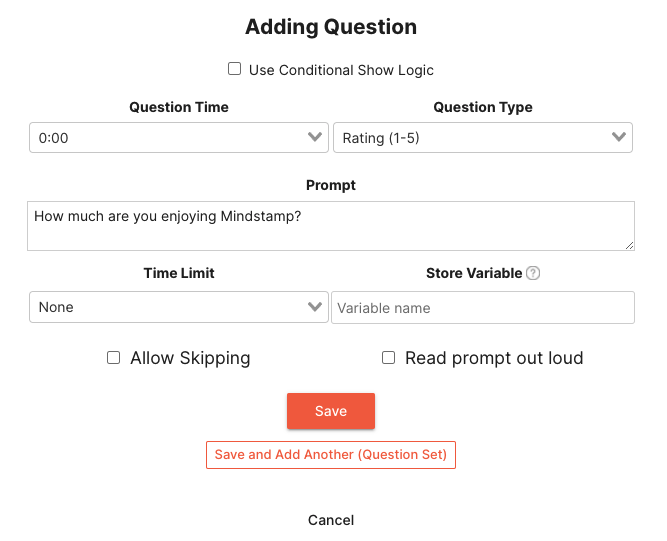
In the Mindstamp editor, once you have selected the question interaction, you can change the question type to “Rating (1-5).” From there, you can add a prompt, time limit, whether to store a variable, and other settings.
Once added to your video, you audience will be greeted with an interactive rating question where they can select 1-5 stars based on their response to your question.
The most common implementations of the rating scale are to get feedback from your audience on the relevance of your information or their satisfaction with your product or service.
Marketing is a common use case in which Mindstamp is used. When a rating question is added to your promotional videos, you can easily gauge who relevant the information is for your targeted audience. Using Mindstamp’s powerful variables and branching interactions, you can use the feedback from your audience to show them material that might be more relevant to them.
Education is another great use case for interactive video, and in particular the rating question type. If you have an instructional course, you can use a rating question to ask your audience about their understanding of the presented material. If they replied with a 5-star rating, it might be time for the next lesson. If they gave a 3-star rating, you can supply them links to further their understanding. Or if they gave a 1-star rating, you can have them rewatch your video to gain a better understanding before proceeding.
Rating questions are a simple way for you to get an understanding of your customers' satisfaction of your products or services. For example, if you are using a rating question to understand the likelihood that your viewers will use your product and you receive a 5-star rating, you could show them an interaction that allows them to share your company information on social media. However, if you received a 1-star rating, you can have them fill out a survey indicating how you can improve.
What gets measured
Related
These combine on one timeline — most videos use three or four together.
Let viewers select every option that applies, and score the whole set rather than a single pick.
Explore →Set the correct response on any question so Mindstamp scores it automatically and reports who passed.
Explore →Collect a real date from the viewer inside the video, in a format that stays usable downstream.
Explore →Ask viewers to circle, mark, or annotate directly on the frame, and keep the drawing as their submitted answer.
Explore →Give viewers a dropdown when there are too many options to show as buttons, and keep the frame clean.
Explore →Ask an open question inside the video and collect typed answers against each viewer, no form page required.
Explore →Questions
Yes. Set the range and the labels so the question matches how your team already reports.
Responses are exportable per viewer with timestamps, so before-and-after comparisons are straightforward.
Try it on one video
One question, one scale, and a distribution you can act on.