Can I make my Mindstamp video autoplay?
Short answer
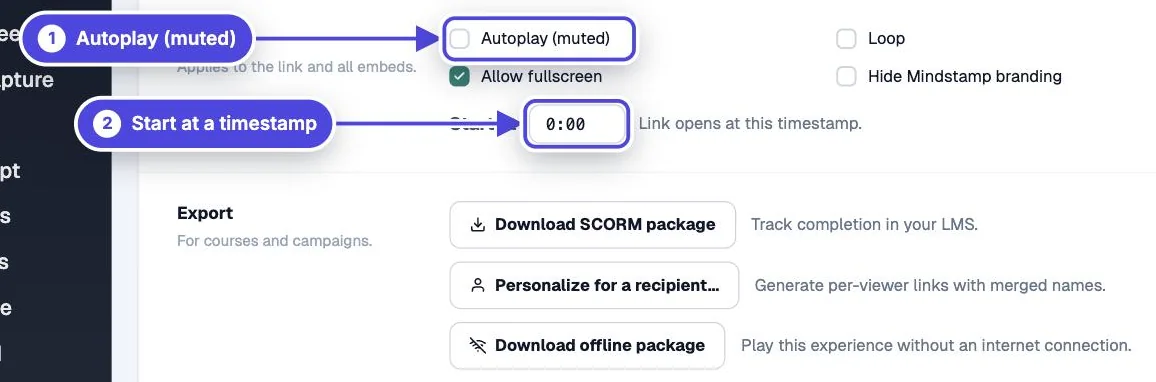
Yes. On the video’s Share page, turn on Autoplay (muted) under Playback, then copy the link or embed code again. The video starts without sound, and the sound turns on when the viewer first clicks or taps the player. A browser can still block autoplay, so the video must also work when the viewer presses play.
How to do it
Copy link to How to do it- Open the video and select Share.
- Under Playback, select Autoplay (muted).
- Copy the share link or embed code again. The setting is added to the code when you copy it.
- Replace any old link or embed code you already placed.
- Test on a computer and a phone in a private window.
Why autoplay is muted
Copy link to Why autoplay is mutedBrowsers block video with sound from starting by itself. They allow muted video to start. Mindstamp starts the video muted and turns the sound on at the viewer’s first click or tap on the player. If the viewer already clicked in the player, for example after a branch, the next video plays with sound.
Autoplay is added to the code
Copy link to Autoplay is added to the codeThe Autoplay (muted), Loop and Start at options add parameters to the link and embed code when you copy them: `autoplay=1`, `loop=1` and `t=` followed by a time in seconds. Code you copied before you changed an option keeps the old behavior. You can also add these parameters to a link yourself.
A link with a start time tries to play from that time. To stop this, add `autoplay=0` to the link.
When autoplay still does not start
Copy link to When autoplay still does not start- Some devices in power-saving or data-saving modes block all autoplay.
- The embed iframe must allow autoplay. Mindstamp embed codes include this. If you changed the code or your platform rebuilt the iframe, check that its `allow` attribute contains `autoplay`.
- Some platforms, such as some LMS mobile apps, block autoplay inside their pages.
- The Popout embed always starts when the viewer opens it, because the viewer already selected it.
Use autoplay with care
Copy link to Use autoplay with careStart the video with a clear visual cue, because the first seconds have no sound. Autoplay on several embeds on one page slows the page and distracts viewers. Keep the player controls visible so a viewer can pause.