How do I change my social share image?
Short answer
The preview image for a shared link is the video’s thumbnail. Open the video’s Design, go to Branding, and change Thumbnail. New shares use the new image. A social network can keep showing the old image for a link it has already read, until you refresh its cache.
How to do it
Copy link to How to do it- Make a landscape image with one clear subject and little small text.
- Open the video and select Design.
- In the Branding section, find Thumbnail and select Change, or Add Thumbnail if there is none.
- Upload or choose the image. The change saves automatically.
- Open Share and check the thumbnail in the page header.
- Paste the share link into the social network’s link preview tool and ask it to fetch the link again.
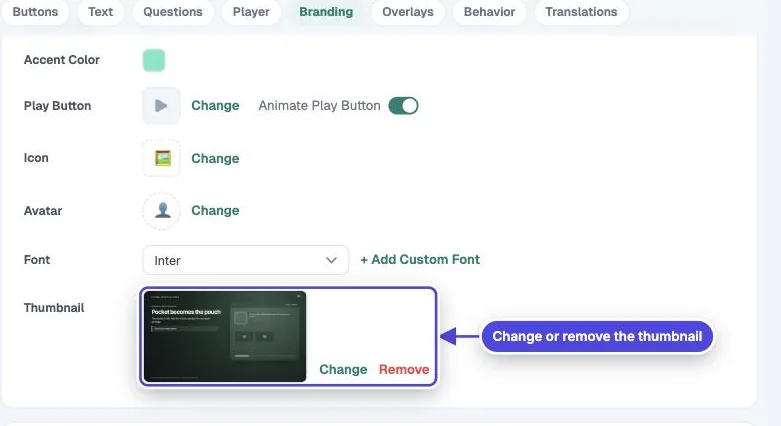
Image size
Copy link to Image sizeMindstamp does not crop the image. Each social network crops it for its own cards. Most networks show a wide card and recommend an image at least 1200 pixels wide. Keep text and faces near the center so a crop does not cut them.
Why the old image still shows
Copy link to Why the old image still shows- Social networks and chat apps save a copy of a link’s preview the first time they read it. A post you made before the change keeps the old image.
- Use the network’s own tool to refresh a link, such as the Facebook Sharing Debugger or the LinkedIn Post Inspector.
- Some apps have no refresh tool. Their cache expires after some time.
The thumbnail has other uses
Copy link to The thumbnail has other usesThe same thumbnail shows in the player before the video starts when Use Looping Preview is off. It is also the image in the Popout embed and in the structured data from Include SEO metadata. Check those places after you change it.
Change the title and description too
Copy link to Change the title and description tooThe preview card also shows a title and description. See control how a video appears when shared.