What does it mean to publish a video?
Short answer
Publishing turns on the video’s share link and embed code for viewers. A new video starts unpublished, and anyone who opens its link sees that the video is not available. Publishing does not post the video anywhere, list it in search engines, or send it to anyone.
How to do it
Copy link to How to do it- Open the video and select Share.
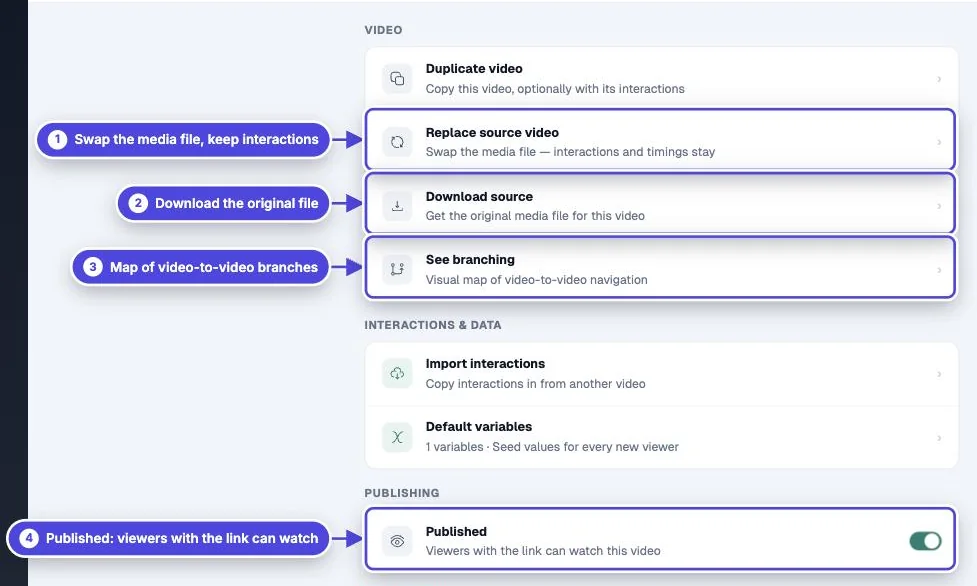
- Select Publish Video. The Share page then shows the share link, embed codes and export options.
- To unpublish later, open More and turn off Published.

What viewers see
Copy link to What viewers see- Published: anyone with the link can watch, unless you set a password or access list in the video’s Settings.
- Unpublished: the link and every embed show “Video not available: Not published”. Your interactions and reporting history stay in your account.
Publish every video in a branch
Copy link to Publish every video in a branchIf the video switches to other videos, each of those videos must also be published. When one is not, the Share page lists it under Unpublished Video Branches with a Publish button. Until you publish it, the switch to that video does not happen for viewers.
Publishing is private by default
Copy link to Publishing is private by defaultMindstamp share pages tell search engines not to index them, so a published video does not appear in search results on its own. To help search engines find a video on your own site, turn on Include SEO metadata when you copy the embed code. It adds structured video data and a collapsed transcript to your page.
When a published video stops playing
Copy link to When a published video stops playing- If the plan is paused, viewers see “Paused” and cannot watch. See pause a subscription.
- If the subscription ends, viewers can no longer load the video. See do I need a subscription after I create my videos.
- If publishing fails with a message that you reached your plan’s video limit, your library is full. Every video in the library counts, including drafts. Delete a video you no longer use or change plans. See what counts as a video.