Can I change a video’s social title, image and description?
Short answer
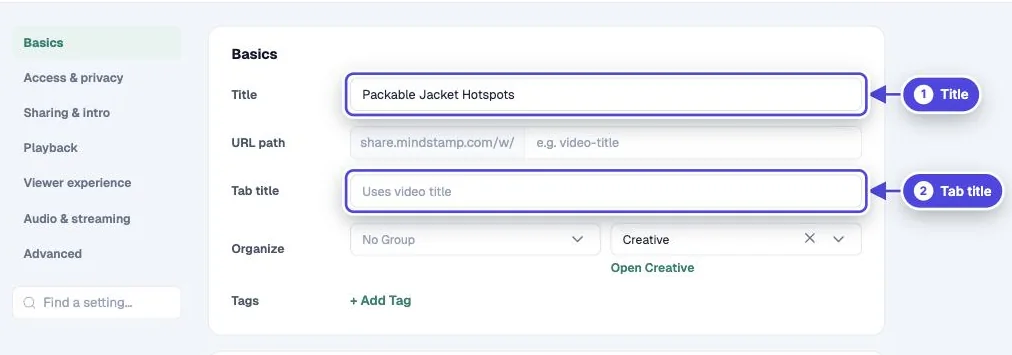
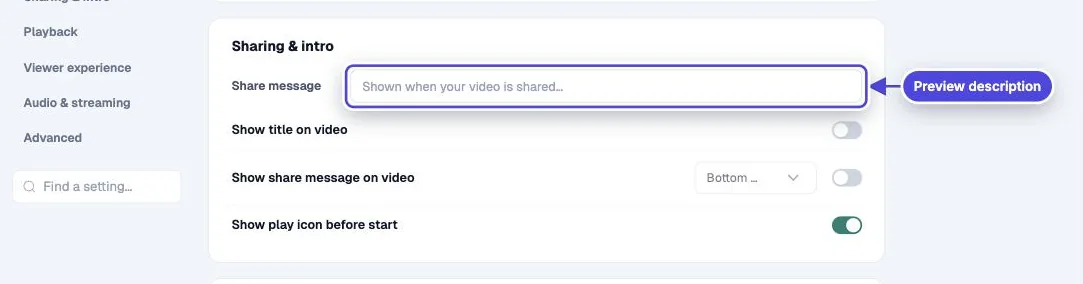
Yes. The preview card uses the video’s Tab title (or its Title if the tab title is empty), its Share message as the description, and its Thumbnail as the image. Change them in the video’s Settings and Design, then refresh the preview on each social network.
How to do it
Copy link to How to do it- Open the video and select Settings.
- In Basics, set the Title. On Core and above, set a Tab title if you want a different title for browser tabs and link previews.
- In Sharing & intro, write a one- or two-sentence Share message. It becomes the preview description.
- Open Design, go to Branding, and set the Thumbnail.
- Copy the share link and paste it into each social network’s link preview tool to check the card.
What each field controls
Copy link to What each field controls- Title: the preview title when Tab title is empty. It also names the video in your library.
- Tab title: the title in the browser tab and in link previews. Core and above.
- Share message: the preview description. You can also show it on the video with Show share message on video.
- Thumbnail: the preview image. See change the social share image.
Personalize the preview
Copy link to Personalize the previewThe title, tab title and share message can include variables such as {{NAME}}. When the link carries a value, for example from a personalized link or a URL parameter, the preview card shows the filled-in text. Variables are available on Core and above. See personalization and variables.
The social network controls the final card
Copy link to The social network controls the final card- Mindstamp provides the title, description and image. The network decides how to crop the image, how much text to show, and how long to keep its saved copy.
- A post you made before a change can keep the old details. Use the network’s preview or debug tool to fetch the link again.
- Share pages tell search engines not to index them. These fields change link previews, not search results.
Interactivity stays behind the link
Copy link to Interactivity stays behind the linkThe preview card opens the Mindstamp player, where the interactions run. If you upload the video file to a social network instead, it plays as a flat video with no interactions.