Can I download my interaction data?
Short answer
Yes. Open Reporting, go to Views, Interactions or Viewers, apply your filters and select Export CSV. When the file is ready you can download it, and it also stays in Reporting > Exports. On Pro and higher plans you can also schedule recurring exports by email or webhook.
How to do it
Copy link to How to do it- Open Reporting and select Views, Interactions or Viewers.
- Filter by date range, video, group, playlist or tag. The export uses these filters.
- Select Export CSV.
- On a Views export filtered to one video, group or playlist, select Include Interactions, Variables, and Location if you need one column for each answer.
- Select Submit. When the export is ready, select Download.
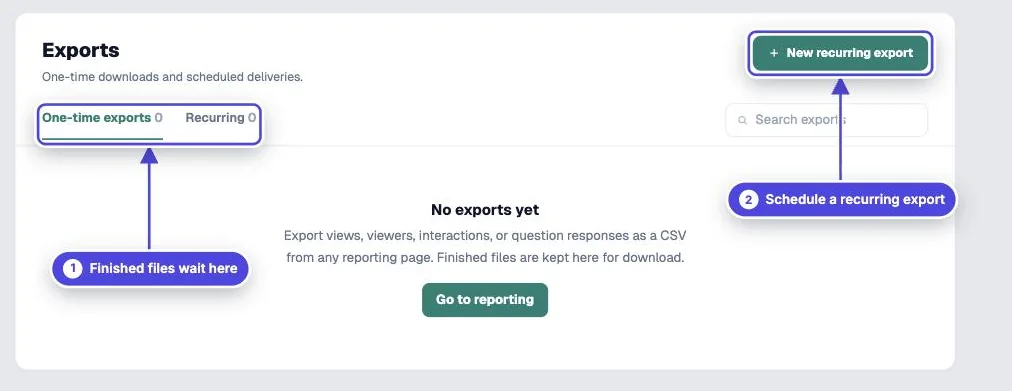
- To find an older file, open Reporting > Exports.
Which export to use
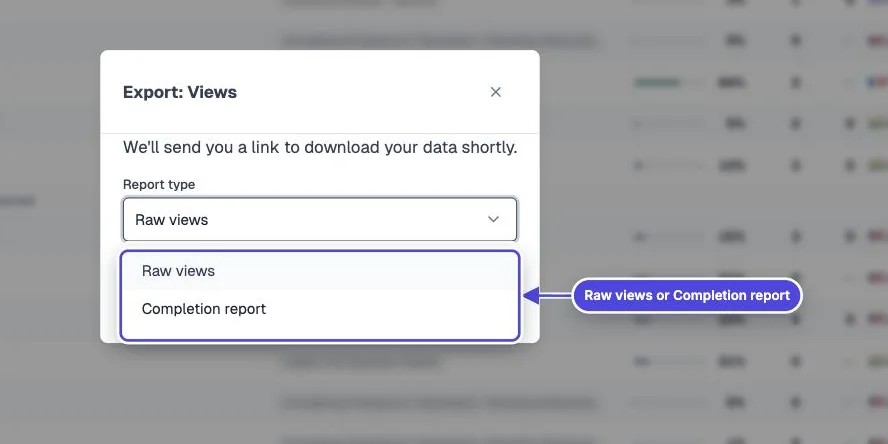
Copy link to Which export to use- Views: one row for each viewing session. This is the best file for completion, scores and watch progress.
- Interactions: one row for each answer, click or response.
- Viewers: one row for each viewer record, with contact fields and totals.
- Completion report: one row for each person, with a score for each video. See one report across several videos.
Answer columns and row limits
Copy link to Answer columns and row limitsThe Include Interactions, Variables, and Location option adds a column for each question and interaction, each variable, and the precise location fields. It shows only when the Views list is filtered to one video, one group or one playlist. The file is larger and takes longer to make.
With that option on, one export holds up to 5,000 rows. Without it, one export holds up to 25,000 rows. For a larger data set, split the export by date range.
Recurring exports
Copy link to Recurring exportsRecurring exports are on Pro and higher plans. Open Reporting > Exports and select New recurring export. Choose views, interactions or viewers, choose the columns, and choose a schedule: daily, weekdays, weekly, twice a month or monthly. You can scope it to several videos, groups, playlists or tags at once. Deliver by Email, which sends a download link, or by Webhook, which posts the rows as JSON to your URL.
Before you share a file
Copy link to Before you share a fileExports can hold names, emails, phone numbers, custom IDs, answers, location and device details. Share them only with people who need them, and delete copies you no longer need.
Exports stop while an account is paused or inactive. Export the reports you need to keep before you pause or cancel.