How do Mindstamp webhooks work?
Short answer
Mindstamp can post three kinds of webhooks as JSON: a view record for each finished session, one record for each interaction, and a lead record for each known viewer. You turn each one on per video. View webhooks are on Core and higher plans, and interaction and lead webhooks are on Pro and higher plans.
How to do it
Copy link to How to do it- Open Integrations in the left menu and select Mindstamp API. Copy Your Webhook Key.
- Optionally, enter default endpoints in View Webhook URL, Interaction Webhook URL and Lead Webhook URL.
- Open the video and select Integrations > Mindstamp API.
- Turn on Send View Webhooks, Send Interaction Webhooks or Send Lead Webhooks, and enter an endpoint for this video if it differs from the default.
- Watch the video in a private window, then close it or wait about two minutes, and check your endpoint.
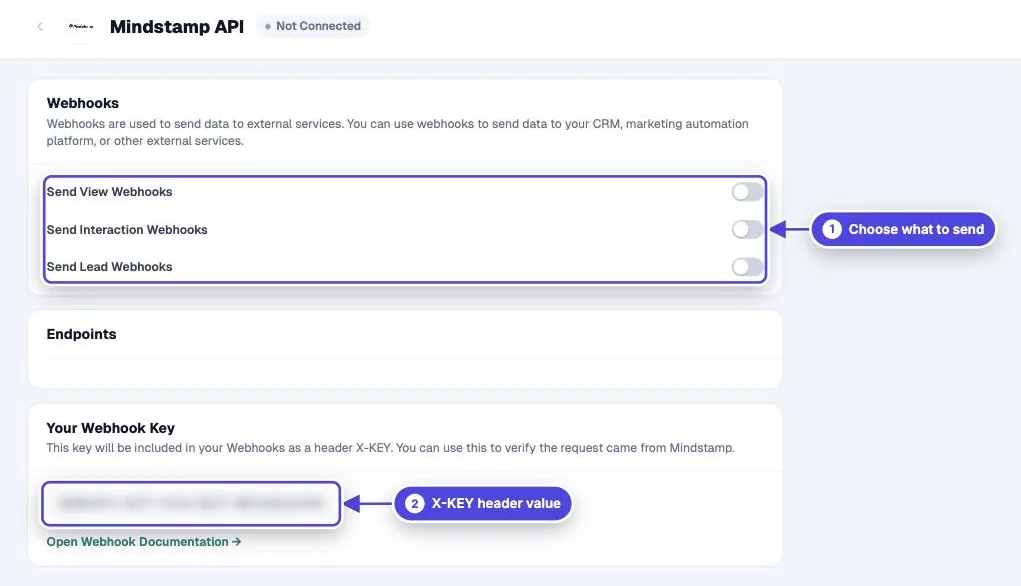
The three webhook types
Copy link to The three webhook types- View: the full view record, with watch progress, scores, identity, location, variables, an `interactions` array and a `responses` map of question to answer.
- Interaction: one answer, click or response, with the prompt, the value, the correct answer, whether it was correct and the time in the video.
- Lead: the viewer record, with name, email, phone, custom ID, variables and totals. It is sent only for a known viewer, and only once for each viewer.
When webhooks are sent
Copy link to When webhooks are sentAll three types are sent after the session is finished: the viewer reaches the end, closes the page, or stops for about two minutes. Interaction webhooks are not sent live during playback. They arrive together after the view. Do not depend on the delivery order.
A per-video toggle must be on. A default URL on its own sends nothing.
Responses, timeouts and failures
Copy link to Responses, timeouts and failuresReturn HTTP 200 or 204 within 15 seconds. Mindstamp records any other status, including 201 and 202, as a failure. There is no scheduled retry, so log what you receive and use the API to fill gaps.
Verify the signature
Copy link to Verify the signatureEvery request has the headers `X-KEY` (your webhook key), `X-Mindstamp-Timestamp` and `X-Mindstamp-Signature`, in the form `t=<timestamp>,v1=<signature>`. The signature is an HMAC-SHA256 of the timestamp, a period and the raw body, with your webhook key as the secret. This Node.js function checks it:
import crypto from 'node:crypto'

// rawBody is the request body exactly as received, before JSON parsing.
export function isMindstampWebhook(rawBody, signatureHeader, webhookKey, maxAgeSeconds = 300) {
  const parts = Object.fromEntries(signatureHeader.split(',').map((part) => part.trim().split('=')))
  const timestamp = Number(parts.t)
  if (!timestamp || Math.abs(Date.now() / 1000 - timestamp) > maxAgeSeconds) return false
  const expected = crypto.createHmac('sha256', webhookKey).update(timestamp + '.' + rawBody).digest('hex')
  const received = Buffer.from(parts.v1 ?? '', 'hex')
  const wanted = Buffer.from(expected, 'hex')
  return received.length === wanted.length && crypto.timingSafeEqual(received, wanted)
}
Payload fields
Copy link to Payload fieldsField names match the API. See exported fields and the API documentation.