How do I use Google Analytics with Mindstamp?
Short answer
Open Integrations, select Google Analytics, enter your Google Analytics ID and save. The player then sends watch-progress events to that property at 10, 25, 50, 75, 90, 95 and 100 percent. Google Analytics is on Core and higher plans. Answers and clicks stay in Mindstamp reports and do not go to Google Analytics.
How to do it
Copy link to How to do it- In Google Analytics, copy the measurement ID of your GA4 web data stream. It starts with G-.
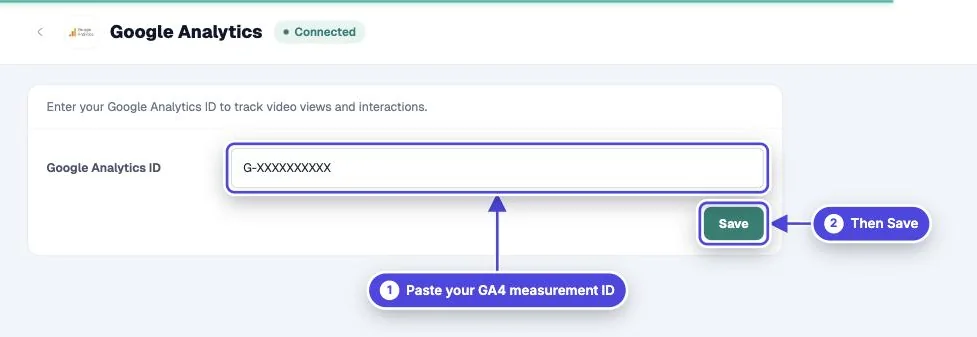
- In Mindstamp, open Integrations in the left menu and select Google Analytics.
- Paste the ID into Google Analytics ID and select Save. To use a different property for one video or group, set the ID on that video’s or group’s Integrations instead.
- Open the video’s share link in a private window and play it past 25 percent.
- In GA4, open Realtime or DebugView and look for the `mindstamp_video_progress` event.
Events Mindstamp sends
Copy link to Events Mindstamp sendsAt each progress milestone the player sends two events. `mindstamp_video_progress` has the parameters `progress_percent`, `video_id`, `video_token` and `video_title`. The second event is named after the milestone, for example `Reached 50%`. Both carry `event_label` (the video title), `event_category` (Video Player Events), `viewer_id` and `page_location`.
Loading the tag also records a page view for the player page, as GA4 does by default. Mindstamp does not send answers, clicks or lead details to Google Analytics.
How progress is measured
Copy link to How progress is measuredMilestones follow the playback position. If a viewer skips ahead to 60 percent, the 10, 25 and 50 percent events are sent together. Each milestone is sent once per session.
Which ID is used
Copy link to Which ID is usedA video uses its own ID first, then its group’s ID, then the account ID. Events are not sent from the editor preview or from offline packages.
Embeds and consent
Copy link to Embeds and consentThe tag runs inside the Mindstamp player, not on your page. `page_location` is set to the page that embedded the video when the browser shares it. Mindstamp does not read your site’s consent banner, so check the setup with your consent and privacy team before you add the ID.